How AI Agents Can Transform Construction: Practical Applications and Challenges

Just before the 2024 end of year holiday, Anthropic, the company behind the Claude model series, released a very clearly articulated post explaining the different approaches to 'Building AI Agents'. At a similar time Y Combinator’s (YC) leadership released a round table where they discuss their bullish view of AI Agents.
In fact there's YC-backed startups like Constructable and Fresco already developing such solutions. Hence I thought it would be interesting to dissect the different approaches highlighted by Anthropic with some practical examples of how agents could be applied to construction.
Firstly, What are Agents?
Anthropic decides to make a clear distinction between Workflows and Agents. Defining the prior as systems where LLMs and tools are orchestrated through predefined code paths, and Agents rather as systems that can dynamically direct their own processes and tool usage to accomplish tasks. If we were to use a construction analogy:
- Workflow: Imagine telling a builder, “Follow this step-by-step blueprint to make a house.” The builder sticks rigidly to the plan, even if problems arise, like material shortages.
- Agent: Now, tell the builder, “Build me a sturdy, cost-effective house.” The builder analyzes the site, considers alternatives, and decides, for instance, to switch from wood to steel framing due to availability.
From here on I'll provide an example of each Workflow and Agent approach most widely used.
Workflow: Prompt chaining
Prompt chaining decomposes a task into a sequence of steps, where each LLM call receives the output of the previous one. You can add programmatic checks (see "gate” in the diagram below) on any intermediate steps to ensure that the process is still on track. (Anthropic)

Construction Example:
For example if you had an AI tool which helps with faster RFI resolution, a prompt chaining process could look something like this:
- Receive RFI → You receive an RFI from another contractor requesting to shift a wall to facilitate with the electrical routing.
- Assess RFI → LLM 1 interprets the request, and it passes the requirement for it to be dealt by the agent rather than site, passing information to the next step in the chain.
- Layout impact check → LLM (or a specialized tool) recalculates the new layout dimensions.
- Code compliance check → Those new dimensions are fed to a code-checking process. which determines if minimum size requirements are still met.
- RFI response → Based on code compliance (or violation), the LLM finalizes a response.
Ultimate Output: Faster, more structured responses to RFIs, ensuring code compliance and minimizing project delays.
Workflow: Routing
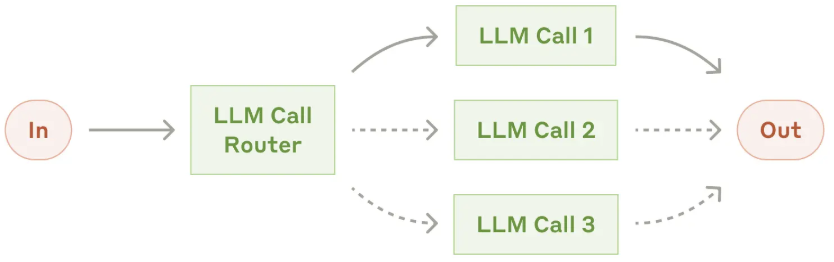
Routing classifies an input and directs it to a specialized followup task. This workflow allows for separation of concerns, and building more specialized prompts. Without this workflow, optimizing for one kind of input can hurt performance on other inputs. (Anthropic)
Construction Example:
Imagine a construction project manager receives all sorts of inbound communication from different channels regarding different topics such as cost overruns, schedule impact, design compliance, labour etc. A project manager’s AI then might:
- Classify the type of inquiry (e.g., is it a scheduling question, a design question, a compliance question, or a budgeting question?).
- Route the inquiry to one of several specialized workflows or prompts:
- Budget Workflow for cost-related inquiries.
- Design Workflow for architectural or engineering questions.
- Compliance Workflow for code-related concerns.
- Scheduling Workflow for timeline or milestone discussions.
Ultimate Output: Faster, more accurate resolutions to project queries, freeing up human managers for higher-value tasks.
Workflow: Parallelization
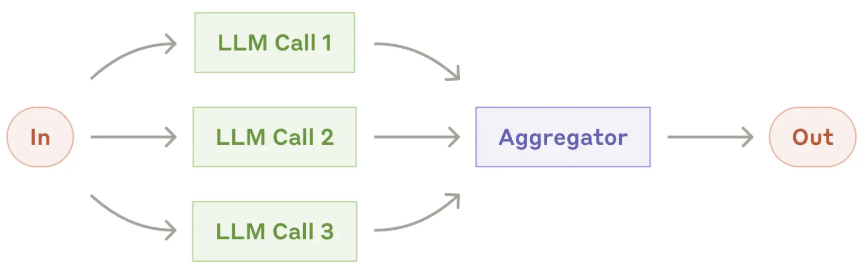
LLMs can sometimes work simultaneously on a task and have their outputs aggregated programmatically. This workflow, parallelization, manifests in two key variations:
- Sectioning: Breaking a task into independent subtasks run in parallel.
- Voting: Running the same task multiple times to get diverse outputs. (Anthropic)
Construction Example:
Imagine you have a HVAC design assistant. For example you may be designing a large commercial building in a hot-humid climate with a priority on lower operational costs, or a high-rise in a cold climate that’s trying to reduce carbon footprint.
The assistant receives inputs like the building’s footprint, climate data, and local code constraints. Then it launches three parallel tasks:
- Cost Analysis Task: An LLM or cost-estimation tool calculates hardware and installation costs.
- Carbon Footprint Task: Another specialized module estimates the embedded carbon of different HVAC configurations.
- Efficiency & Operational Costs Task: A third module projects energy usage over the building’s lifetime based on local climate and occupancy patterns.
Ultimate Output: All three tasks run in parallel, each producing a recommendation with numeric metrics. The workflow then aggregates those outputs, comparing trade-offs between the proposals. Finally, it suggests the most balanced design that meets budget, carbon goals, and efficiency targets—and flags any code violations or must-have changes for further review.
Workflow: Orchestrator-workers
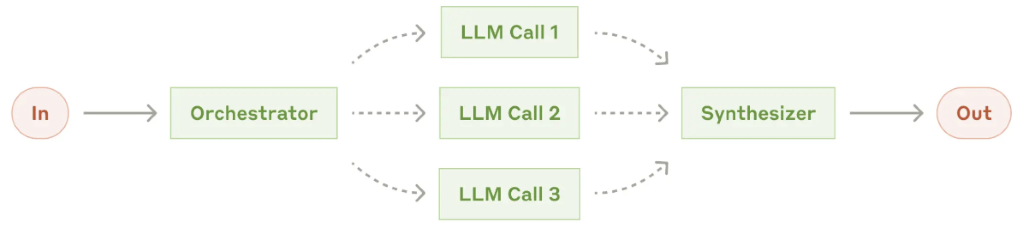
In the orchestrator-workers workflow, a central LLM dynamically breaks down tasks, delegates them to worker LLMs, and synthesizes their results. The key difference from parallelization is its flexibility, subtasks aren't pre-defined, but determined by the orchestrator based on the input. (Anthropic)
Construction Example:
You’re a large building owner, preparing tender documentation for a new project. You have a vault of old documents—Word files, PDFs, Excel spreadsheets, Revit models, IFC exports—each containing pieces of information you want to reuse or adapt.
- Discovery & Classification
- The Orchestrator scans your repository, detects the various file types, and flags content needing updates. For example, it finds all references to the “2019 building code” that must be updated to “2023 building code.”
- Dynamic Delegation
- If the file is a Word doc, it calls the “Word-editor worker” LLM to rewrite headings, update references, or correct building codes. If it’s a Revit model, it hands it off to the “BIM worker” that can parse the building geometry and rename structural elements.
- Parallel Processing
- Multiple files are updated simultaneously by their respective worker LLMs.
- The Orchestrator monitors progress, reassigns tasks if a particular file needs more specialized attention, and catches errors like missing code references or conflicting naming conventions.
- Synthesis & Assembly
- Once each worker finishes, the Orchestrator merges all updated documents, ensuring a uniform naming scheme and consistent references.
- It then creates a neatly structured folder for the new tender package, ready for final review.
Ultimate Output: Accurate, professional tender documents generated far faster.
Workflow: Evaluator-optimizer
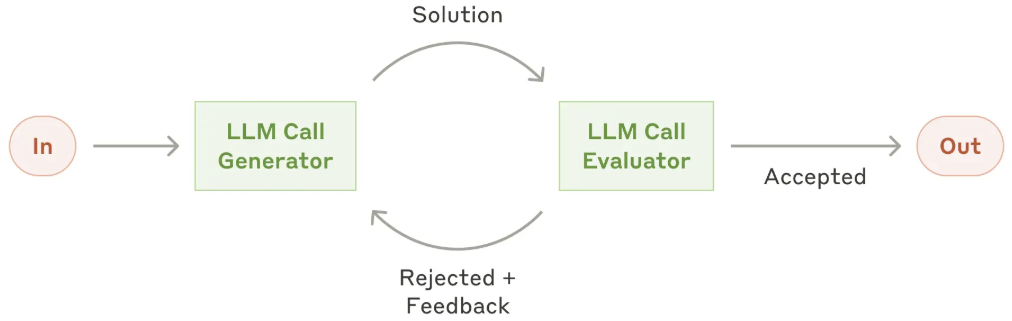
In the evaluator-optimizer workflow, one LLM call generates a response while another provides evaluation and feedback in a loop.
Construction Example:
You're a supplier of doors and windows and you wish to create a new sales channel by creating BIM families of your different products. Currently, each product variation—hundreds in total—exists only in PDF brochures with incomplete or inconsistent labeling. Your goal is to generate a consistent JSON schema capturing properties like dimensions, materials, finish options, and compliance codes.
- Optimizer’s First Pass:
- The “optimizer” LLM parses the PDFs, attempting to extract relevant product details into a JSON template.
- Evaluator’s Review:
- A separate “evaluator” LLM checks if each JSON object matches the schema (e.g., do we have “thickness”? “fire rating”?). It flags missing or incorrect fields.
- Refinement Loop:
- Armed with feedback—“We’re missing thickness on door models X, Y, and Z”—the optimizer re-runs its parsing logic, searching through the PDFs again (perhaps referencing page footnotes or a separate data table).
- This back-and-forth repeats, gradually eliminating errors and fleshing out each product’s JSON record.
- Final Verification:
- Once the evaluator sees that all required fields are present and correctly formatted, it approves the JSON.
Ultimate Output: High-quality, schema-compliant BIM files that reduce manual labor and errors.
Agents
Construction Example:
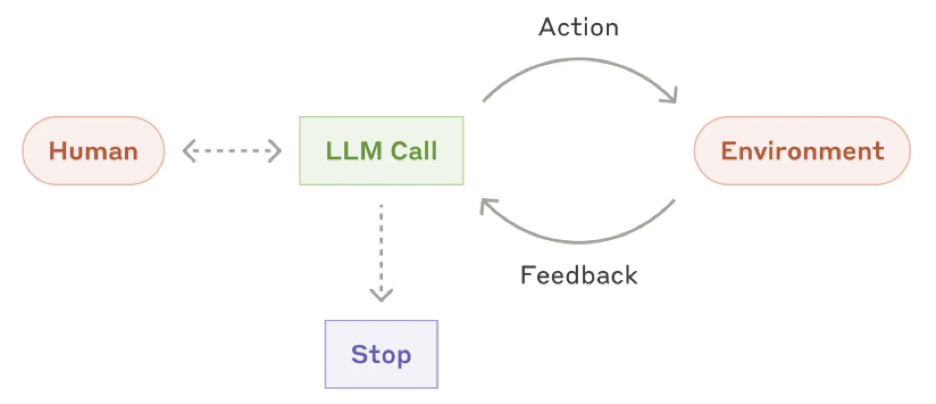
You're a property owner seeking to retrofit an office building to cut energy consumption by 20%, all while adhering to a strict budget and timeline. You assign the task to an AI agent, providing only high-level goals.
1. Autonomous Problem Scoping
The AI independently identifies key tasks:
- Site Analysis: Extracts data from CAD/BIM models, assessing layouts, structural details, and HVAC systems.
- Energy Modeling: Simulates baseline energy use and identifies inefficiencies.
- Cost Estimation: Predicts costs for retrofit options like insulation, window upgrades, or solar.
- Code Compliance: Checks zoning laws and permit requirements to avoid regulatory hurdles.
2. Dynamic Strategy Selection
The AI evaluates trade-offs between solutions, considering cost, energy savings, timeline, and permits. If insulation alone can’t achieve the goal, it proposes a hybrid strategy (e.g., solar + HVAC upgrades), dynamically adapting to challenges like permit requirements.
3. Iterative Exploration
When critical data is missing (e.g., outdated blueprints), the AI proactively requests information or retrieves it from archives, ensuring the process isn’t derailed by incomplete inputs.
4. Optimized Execution Plan
The AI delivers a comprehensive plan:
- Detailed cost breakdown and project schedule.
- Permit instructions aligned with local regulations.
- Contingency strategies for disruptions, like material cost spikes.
If conditions change mid-project, the AI re-optimizes in real time, ensuring the project stays on track.
Ultimate Output: A comprehensive retrofit plan, dynamically optimized in real-time as conditions change.
How do you think AI Agents will change construction? Have you already implemented some of these applications in your businesses?
Cheers,
Site Steer team
If you work in construction, climate tech and would like to reach out to us to share about some interesting project, innovation or startup please reach out to at sitesteer.ai@gmail.com!